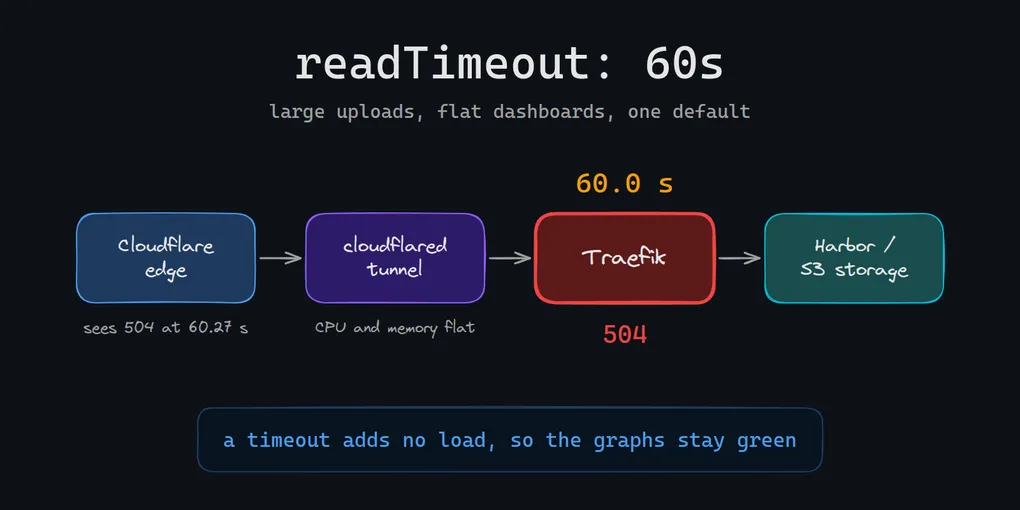
I stopped pushing large images to Harbor because the pushes kept failing. The cause was a default in Traefik, which I had adopted only because ingress-nginx was retired.
It took me a while to see that, and the reason is the useful part. Every metric I had said the system was healthy.
The setup
The cluster is new and runs on bare metal. Only HTTP and HTTPS need to be reachable from outside. Everything else is consumed inside the private network or the cluster, where eBGP handles routing fine.
For the public side I used Cloudflare Tunnel. A tunnel needs no public IP on the cluster. Cilium’s L2 announcements were still beta and send all inbound traffic for an address to a single node, so I didn’t want to build the edge on them. The tunnel also removed two chores. I didn’t have to set up authenticated origin pulls, and I didn’t have to maintain a firewall that blocks every IP outside Cloudflare’s ranges, because the origin only makes outbound connections.
The request path is Cloudflare’s edge, the tunnel, Traefik, then the service. Traefik was my ingress because ingress-nginx, the previous default, was retired in March 2026. I knew nginx’s timeouts well. I knew almost nothing about Traefik’s.
The first failure: Harbor
My images lived on GHCR. GitHub’s docs say fine-grained tokens don’t cover Packages, and I found no native way to issue a pull credential limited to part of an account’s images. Harbor has project-level RBAC and robot accounts that stay inside one project, so I ran Harbor in the cluster.
CI pushed built images to it. Small images went through. Large ones timed out, and not every time. I tried to work around it from the client side, and the workarounds were flaky. In the end I stopped sending anything over 100 MB through Harbor.
I put the failures down to something in front of Harbor, most likely Cloudflare. Prometheus had nothing to contradict that. It had nothing to confirm it either.
The same failure in a second place
A separate project needed object storage. It builds kernel and root filesystem images for microVMs, each a few gigabytes. They lived in a hosting provider’s object store, and the provider had no region near the nodes that run the microVMs. Whenever the artifact cache expired or a new artifact shipped, every node pulled it from another region over a congested public route.
So I moved storage into the cluster: an S3-compatible store behind the same tunnel and the same Traefik. The first publish was a huge multipart upload, and I split it into 100 MB parts.
Some parts failed. Most went through.
Ruling things out
Splitting the upload into 100 MB parts didn’t stop the failures. The cloudflared pod’s CPU and memory sat flat. Nothing was overloaded, so something configured was cutting the connections.
The public internet doesn’t guarantee throughput, which matches the pattern. A part that hit a slow stretch took longer than the others, and only those parts failed.
Looking at each hop
The cluster was new, so observability was already in place. Prometheus and Loki had told me nothing useful. Tempo was the missing piece. I pointed Traefik’s tracing at it, turned on Cloudflare’s trace export to the same place, and retried the upload.
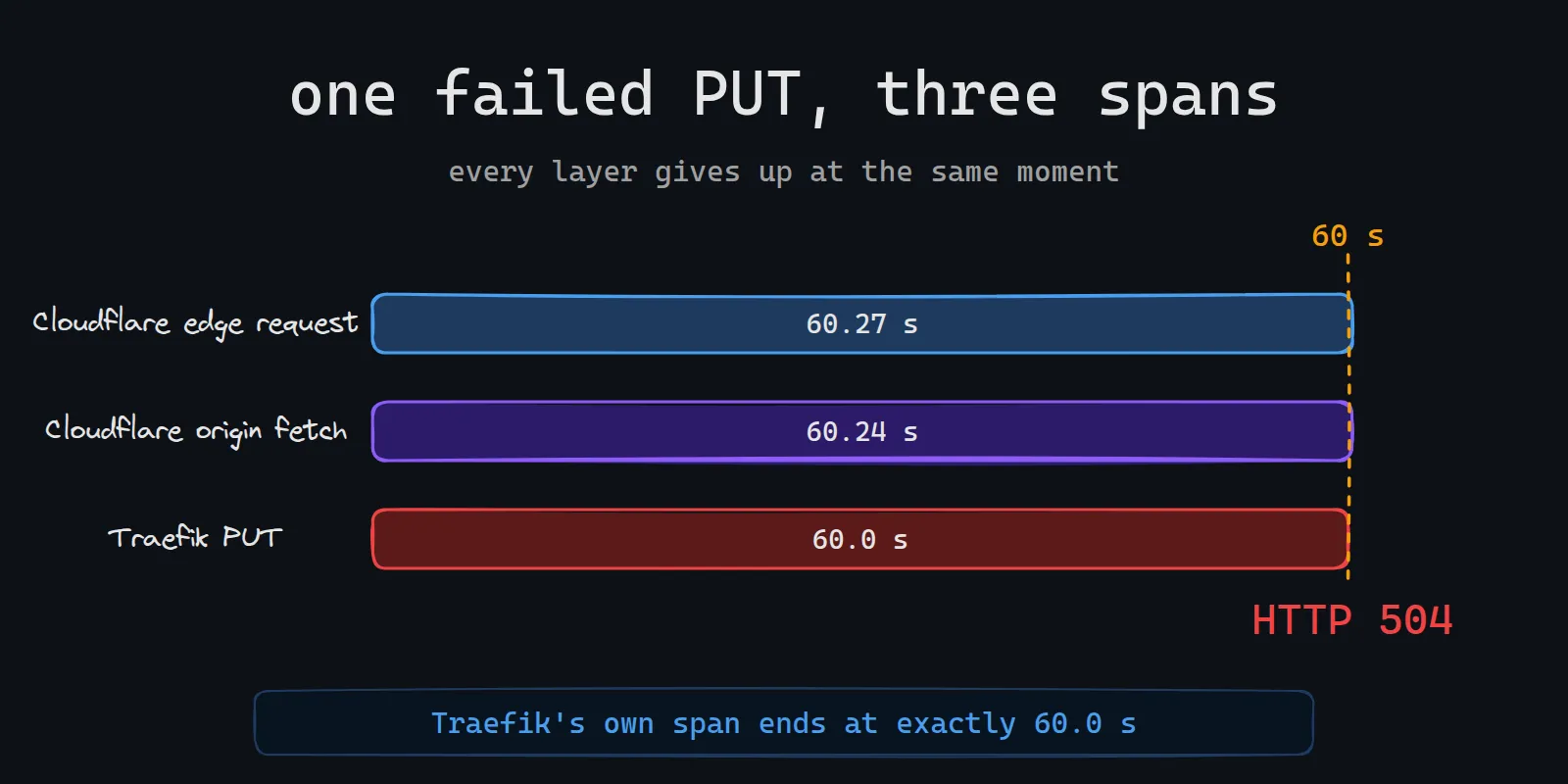
A failed part looked like this:
| Where | Span | Duration | Status |
|---|---|---|---|
| Cloudflare edge | whole request | 60.27 s | 504 |
| Cloudflare | origin fetch | 60.24 s | 504 |
| Traefik | PUT |
60.0 s | 504 |
Cloudflare saw the origin answer 504 after about 60.2 seconds. Traefik’s own span ended at exactly 60.0 seconds. A network fault doesn’t end at a round number.
The default
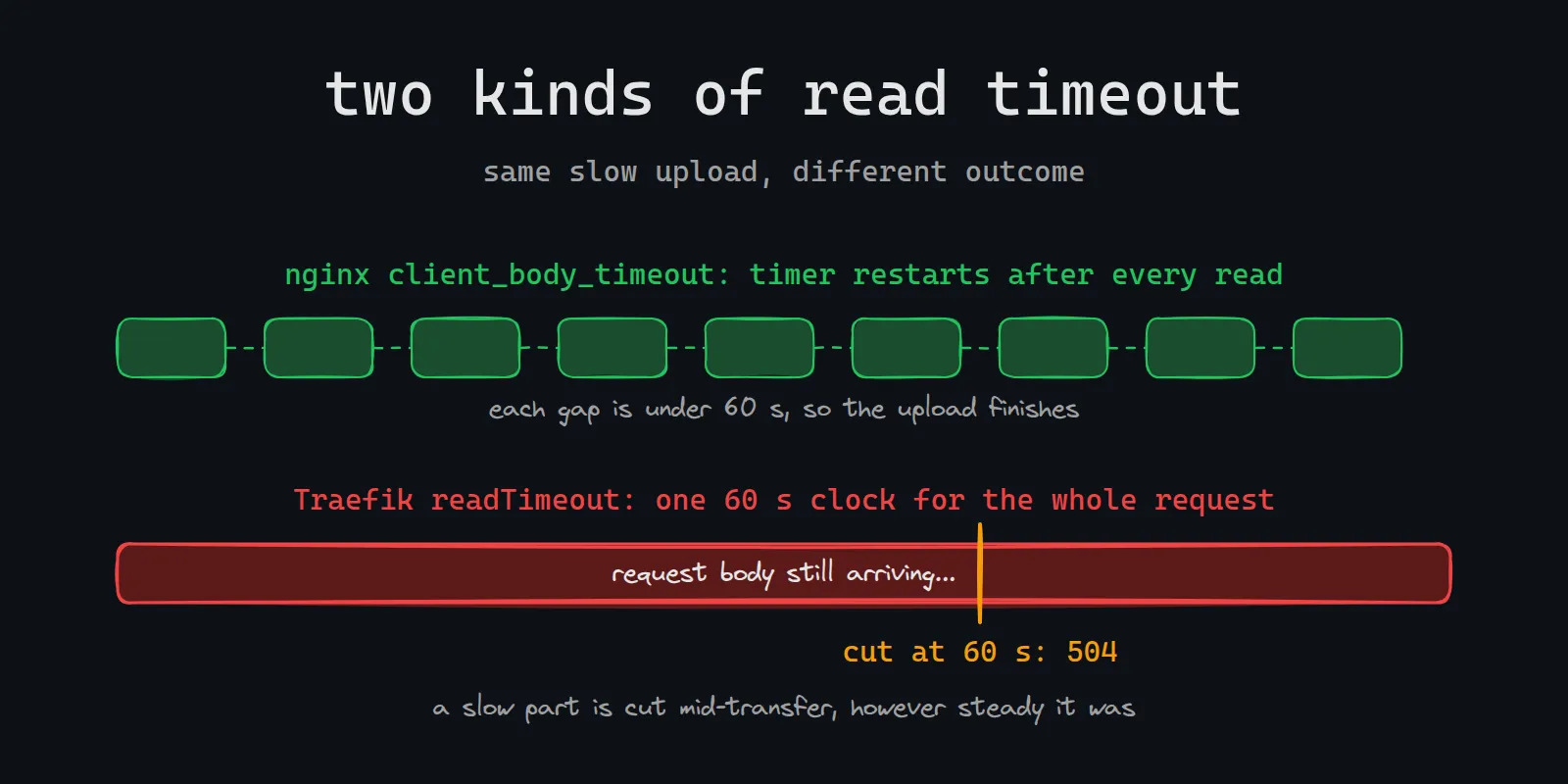
Traefik’s entrypoint readTimeout defaults to 60 seconds, and the docs say it covers reading the entire request, including the body. A multipart part is one request. Any part whose body took longer than a minute to arrive was cut with a 504, whatever the client was configured to tolerate.
That explained everything I had seen. The failures were intermittent because the speed of the public route varied, and client-side workarounds did nothing because the limit lived on the server. Prometheus showed nothing because a timeout adds no load.
The fix is two lines per entrypoint:
apiVersion: helm.cattle.io/v1
kind: HelmChartConfig
metadata:
  name: rke2-traefik
  namespace: kube-system
spec:
  valuesContent: |-
    ports:
      web:
        transport:
          respondingTimeouts:
            readTimeout: 10m
      websecure:
        transport:
          respondingTimeouts:
            readTimeout: 10m
nginx behaves differently. Its client_body_timeout limits the gap between two successive reads of the body, so a slow but steady upload survives it. Traefik’s limit covers the whole request. I had no reason to know that difference until I migrated.
After the fix
I retried the huge upload and it went through cleanly. Then I retried Harbor, and the large pushes that used to fail succeeded.
What I’d carry forward
An intermittent failure that ends at a round number is a timeout until something proves otherwise. Metrics measure load, and a timeout adds none, so the dashboards can stay green the whole time.
When a deprecation forces you onto a new component, read its timeout defaults before you send your largest request through it. Put traces in before you need them. The hop I couldn’t see was the one at fault.
I dropped Harbor for large images on a wrong explanation, and I only found the right one because a different project forced me to look.