Every 90 seconds or so, one of our TCP connections went quiet for 30 seconds. No errors. No drops. Every counter on every machine said the network was fine.
The connection was a long-lived gRPC stream between a node agent and a control plane, both in production, both on a private network at a hosted provider. When it stalled, the agent reconnected, and our retry logic hid most of the damage. That is also why it took days to notice how bad it was.
I spent two of those days convinced the provider’s network was dropping packets. I had a support ticket drafted. It was wrong.
This post walks through how the bug looked, why the wrong theory was so convincing, and the 15-minute test that found the real cause. If you have ever stared at clean counters and a broken connection, this one is for you.
New to this? What is a “stall” and why would TCP go quiet?
TCP promises reliable delivery. If a segment is lost, the sender retransmits it, waiting longer each time (exponential backoff). So from the application’s point of view, loss does not look like an error. It looks like silence: the data you expect never shows up, then the retries run out, and the socket finally times out.
That is why “the connection hangs for 30 seconds, then dies” is a classic symptom of packets going missing somewhere. It is also the symptom of several other things, which is the point of this post.
The symptom
A soak test against the production address showed the same pattern repeatedly:
- One test connection stalled 62 times across 57 connections in 3 hours.
- The median gap between stalls was 91 seconds.
- Each stall was about 30 seconds of silence, then a timeout and a reconnect.
- Control tests, a lab cluster and the same service reached over a public path from two other hosts, ran for the full three hours with zero stalls.
The only path that failed was the one crossing the private network between two specific hosts. I’ll call them the control node (runs the services) and the compute host (runs the agent).
On the failing path, a capture inside the server’s container showed the server sending the same reply nine times, with the gaps doubling each time (0.2 s, 0.2 s, 0.4 s, 0.8 s, up to 13 seconds). That is TCP backoff. The client never acknowledged the reply, so the reply was getting lost somewhere after it left the server.
The wrong theory: the provider’s network drops frames
I matched packets segment by segment between captures taken on both hosts. For traffic from the compute host to the control node, every segment arrived: 286 sent, 286 received. For the other direction:
| Direction | Sent | Received | Missing |
|---|---|---|---|
| Compute host to control node | 286 | 286 | 0 |
| Control node to compute host | 322 | 210 | 112 |
The 112 missing segments clustered into groups that lined up with the client’s stall timestamps. Seven of nine groups were exactly nine copies of one reply segment, which is exactly what the backoff pattern predicts.
So the picture was: packets leave the control node and never arrive at the compute host. And only in one direction. That looks like a fabric problem. It looks like someone else’s problem.
What made the theory stick was that nothing contradicted it:
- NIC counters were clean. No transmit errors, no receive errors, no missed packets on either side. (There were small receive drops every 11 seconds on both ends, but they did not line up with the stalls.)
- The two captures disagreed in the way a lossy link would. One end showed the frames leaving. The other never showed them arriving.
- Everything else worked. The lab and the public path were fine, so “our config” seemed unlikely.
I read “no counter shows a drop” as “the loss is somewhere counters cannot see.” That was the mistake. There was a second reading that fit the evidence equally well, and I never tested it: the packets were not lost. They were delivered to somewhere else.
New to this? Why would a packet vanish without any counter noticing?
Counters on a network card count things that go wrong on that card: a frame arrived corrupted, the receive queue overflowed, a transmit failed. A frame that leaves the sender perfectly and is received perfectly by a different machine breaks none of those rules. The sender did its job. The wrong receiver did its job. Only the intended receiver is missing a packet, and nobody counts that.
Think of a courier who delivers every parcel flawlessly, to the wrong house.
The investigation: shrink the test
Before sending the ticket, I wanted a cleaner reproduction. The production path had a lot of moving parts: Kubernetes, a load balancer, a CNI doing connection tracking, a routed hop. Any of them could be the culprit, and each one made my captures harder to read.
So I removed all of them. The new test was two plain programs, an echo server and an echo client, running directly between the two private addresses of the hosts. No containers, no load balancer, nothing but a socket and a wire.
It still failed. In 15 minutes: 10 stalls, and 112 of 186 segments from the control node to the compute host missing, while 0 of 245 going the other way. So Kubernetes and the CNI were innocent, and the bug lived at or below the IP layer.
Then I did one more thing: I swapped the roles and ran traffic in both directions at the same time, with ping as well. This was the experiment that mattered, because it separates “which direction is physically broken” from “which side is the client”.
The results were confusing in a useful way:
- Ping from the control node to the compute host: 0% loss.
- Ping from the compute host to the control node: 36.9% loss.
- Connections to the compute host’s address were refused or reset.
If the fabric were dropping frames on one direction of the cable, the loss would follow the cable. It did not. It followed a particular IP address. Whenever traffic was sent to the compute host’s address 10.20.0.2, something went wrong. And the replies to the compute host’s pings, being addressed to that same address, were the ones that got lost.
The reveal: look at the destination MAC
I ran the capture one more time, and this time I looked at the Ethernet header, not just the IP header: tcpdump -e, which prints the destination MAC address of every frame.
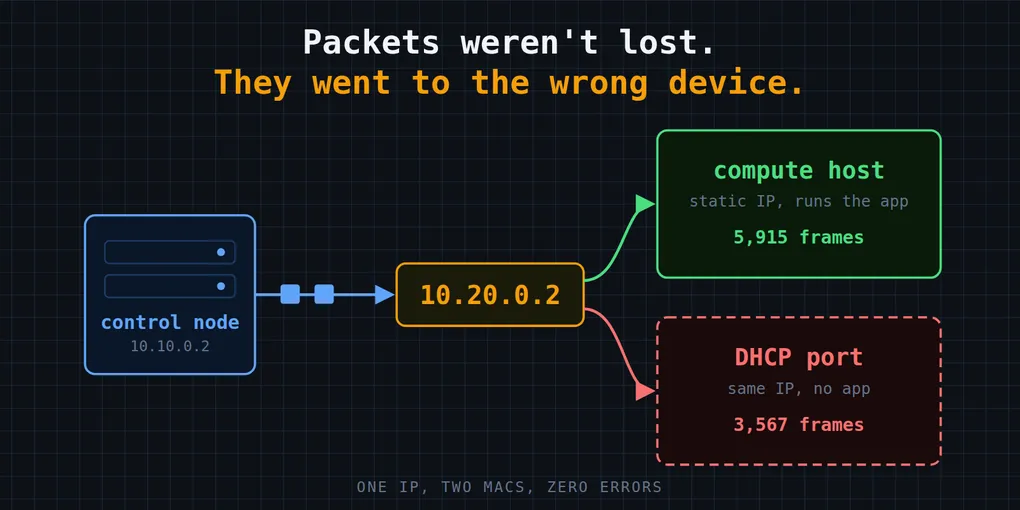
The control node had sent frames addressed to 10.20.0.2. Here is where they actually went:
| Destination MAC | Frames |
|---|---|
02:00:00:aa:aa:01 (the compute host’s real NIC) |
5,915 |
fa:16:3e:00:00:d6 (someone else) |
3,567 |
The compute host received exactly 5,915 frames, no more, no fewer. Every one of the other 3,567 had been delivered, correctly and without error, to a device I did not know about.
Then I went back to a capture from two days earlier that included ARP traffic, and searched it for that second MAC. It was there. 24 ARP replies saying 10.20.0.2 is-at fa:16:3e:00:00:d6. The evidence had been sitting in my own captures since the first day. I had filtered ARP out of most of them, and in the one that included it, I never searched for other MACs.
New to this? IP vs. MAC, and what ARP does
An IP address says which machine you want to talk to. A MAC address says which network card on the local network should physically receive the frame. To send to 10.20.0.2, your machine has to find out which MAC currently owns that IP.
It does this with ARP: it broadcasts “who has 10.20.0.2?”, and the owner replies “I do, my MAC is X”. The answer is cached in a neighbor table (ip neigh), and every frame to that IP is then addressed to that MAC.
ARP trusts whoever answers. If two devices answer for the same IP, the cache keeps whichever reply arrived last, and traffic starts going to one or the other.
The root cause: a DHCP port on an address someone else was using
The second MAC belonged to a Neutron DHCP port. In OpenStack-based private networks, each DHCP-enabled subnet gets a port that serves DHCP and DNS for the subnet, and that port takes an IP address from the subnet’s allocation pool.
Here is the chain of events:
- The subnet had DHCP enabled, with an allocation pool starting at
10.20.0.2. - The compute host had
10.20.0.2configured as a static address in its OS, outside anything DHCP knew about. - When the subnet was created, Neutron created its DHCP port and assigned it the first free address in the pool:
10.20.0.2.
Neither side knew about the other. Nothing refused the assignment. For almost twelve days, two devices on one Layer 2 network answered ARP for the same IP.
Why it was intermittent
The control node’s ARP cache for 10.20.0.2 held whichever reply arrived most recently. While it pointed at the compute host, everything worked. When it flipped to the DHCP port, every segment the control node sent to 10.20.0.2 went to a device that does not run our application. That device either dropped the traffic or answered with a TCP reset. (It did answer pings, which is why one direction of the ping test looked healthy.)
Then the cache refreshed, the other device’s reply won, and the connection came back.
I checked this against the capture from the first day. ARP replies from the DHCP port’s MAC appeared at 06:18:57, 06:27:54 and 06:30:13. Three of the stall bursts began at 06:18:58, 06:27:56 and 06:30:08. I only compared those three, not all 24, and I did not measure the exact flipping mechanism, so I would call this strong evidence rather than proof. But the fix test (below) does not depend on it.
It also explains the “clean counters” puzzle completely:
- The control node transmitted every frame successfully. Its counters were right.
- The compute host never received the misdirected frames. Its counters were right.
- The one-way pattern: the control node’s own address had no conflict, so the compute host’s traffic always reached it.
- The lab and public-path controls did not have a DHCP port holding the same address.
- The routed path through the load balancer was a distraction. It used the same return address, so it failed at the same moments.
The fix, and a like-for-like test
With the system owner’s approval, I made two changes, and nothing else:
- Moved the DHCP port from
10.20.0.2to10.20.0.10. - Changed the subnet’s allocation pool to start at
10.20.0.10, so DHCP can never hand out.2again.
I saved snapshots of the subnet and the port before changing them. Then I re-ran the exact same 15-minute test:
| Check | Before | After |
|---|---|---|
| TCP client timeouts or resets | 10 and 152 | 0 and 0 |
| Ping control node to compute host, loss | 0% | 0% (4500 of 4500) |
| Ping compute host to control node, loss | 36.9% | 0% (4500 of 4500) |
Frames sent to 10.20.0.2 that reached the compute host’s real MAC |
5,915 of 9,482 | 9,277 of 9,277 |
| ARP replies from the second MAC | repeated | none |
Fifteen minutes is short. Before the fix, a stall appeared every 60 to 90 seconds, so the test covered at least ten expected events and none happened. That is a good sign, not a long-term confirmation, so I kept watching production for the next day or two.
Quick detection: three commands
If you suspect a duplicate IP on a network you can reach, these take under a minute:
# More than one MAC in the replies means a duplicate
sudo arping -I eth0 -c 5 10.20.0.2

# Note the MAC, then watch whether it changes
ip neigh show 10.20.0.2

# Look for two different "is-at" MACs for one IP
sudo tcpdump -ni eth0 -e arp and host 10.20.0.2
And in OpenStack, find out which port holds the address:
openstack port list --network <network-id> \
  -c id -c mac_address -c fixed_ips -c device_owner
What I’d tell a colleague
1. Clean counters do not prove loss, and they do not disprove it either. A frame sent to the wrong device leaves no error anywhere. Before you decide packets are being dropped, check where they are being addressed.
2. Capture at both ends, and include ARP. The cause was visible on day one in a capture I did not read carefully. Link-layer addresses would have told me immediately.
3. Reduce the test before you escalate to a vendor. Two echo programs, run in both directions at once, were faster and more conclusive than days of work at the Kubernetes level. They also kept me from sending a support ticket that blamed someone else for my own subnet.
4. A static address inside a DHCP pool is a latent fault. If a network uses both, keep an inventory of the static addresses and reserve each one or exclude it from the pools. We had a second subnet with the exact same exposure, which I only found because I went looking after the fix.
5. Keep your infrastructure code and your live state in sync. The correct pool had been written in Terraform but never applied. If the next apply had reverted the live fix, the bug would have come back with no warning.
A hard-to-find bug is rarely hard because of its complexity. This one was a single wrong address. It was hard because every instrument I trusted was measuring something that was working correctly, and none measured the thing that was wrong. Next time something goes missing, I will ask where it went before I ask where it was lost.